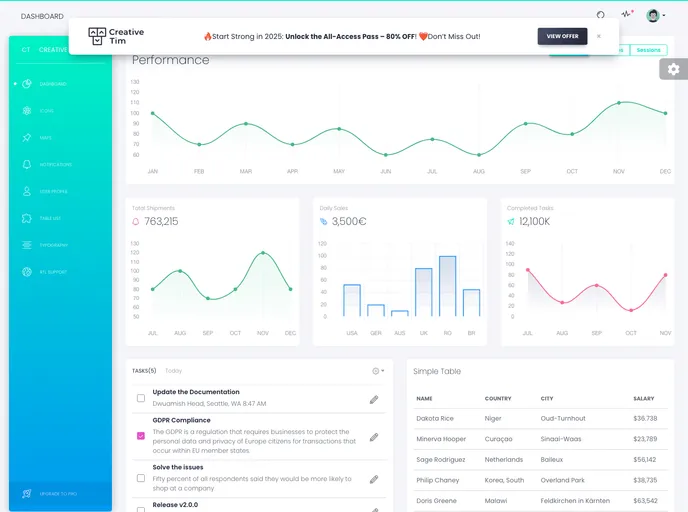
Vue White Dashboard screenshot

Vue White Dashboard

Updated: 25 Jul 2024
54 Stars

Vue White Dashboard by Creative Tim

Categories

Overview:

Vue White Dashboard is a Bootstrap 4 Admin Dashboard designed to manage and visualize data for businesses. It offers a range of components that are visually appealing and easy to use. The dashboard comes with all the necessary plugins and has extensive documentation to help users get started.

Features:

  • Huge number of components: Vue White Dashboard offers over 16 individual components, allowing users the freedom to choose and combine them for their specific needs.
  • Easy customization: All components can be easily customized with variations in color using SASS files, saving time during the development process.
  • Dark and Light Mode: The dashboard comes with two versions - Dark Mode and Light Mode - providing users with options to suit their preferences.

Installation:

To install Vue White Dashboard, follow these steps:

  1. Clone the repository from GitHub:
git clone [repository_url]
  1. Install the required dependencies using NPM:
npm install
  1. Build the project:
npm run build
  1. Start the development server:
npm run serve
  1. Open your preferred web browser and navigate to http://localhost:8080 to access the dashboard.

Summary:

Vue White Dashboard is a user-friendly Admin Dashboard built with Bootstrap 4. It offers a wide range of components, easy customization options, and support for Dark and Light Mode. With its comprehensive documentation and plugins, it provides a powerful tool for managing and visualizing data for businesses.
