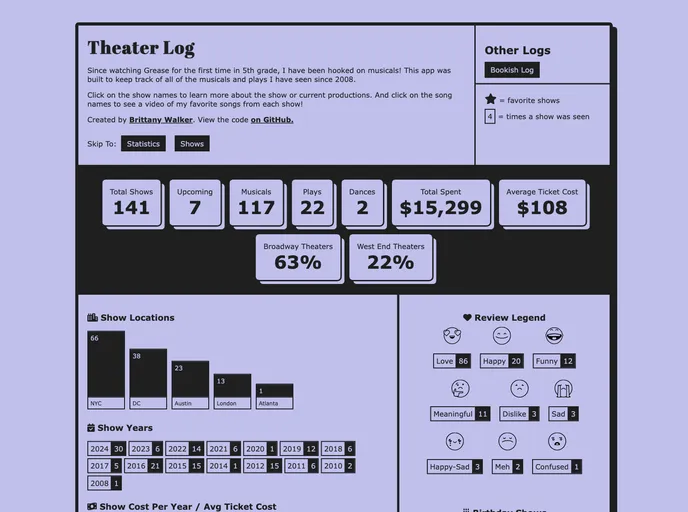
Theaterlog screenshot

Theaterlog

Author Avatar Theme by Brittanyrw
Updated: 20 Oct 2025
16 Stars

A personal theater show tracker listing every show I have seen since 2010, built with Vue.js.

Categories

Overview:

TheaterLog is a log of all of the musicals and plays the author has seen since 2010. It is built using Vue.js and Contentful, and consists of Show Cards that are created for each show seen. The site also includes statistics on the number of shows seen and number of musicals seen, as well as a guide to review emojis. Users can create their own tracker by following the setup guide provided.

Features:

  • Show Cards: Each show generates a card with the show name, theater and city, month and year, label indicating if it’s a musical or play, opinion stickers (favorite, review emoji), and a numbered card showing the number of times the show has been seen.
  • Statistics: The top hero section of the site displays statistics such as the number of shows seen, number of musicals seen, etc.
  • Customization: Users can customize their own tracker by following the provided setup guide. They can track movies, TV shows, songs, and more.

Installation:

To install the TheaterLog theme, follow these steps:

  1. Get the code: Fork the repository to your GitHub account and clone it to your local machine using git or the GitHub CLI.
  2. Get Contentful: Create a Contentful account and sign up.
  3. Get credentials: Create a new space in your Contentful account. Make note of the Space ID in Settings > General Settings. Generate an access token for the Content Delivery API in Settings > API keys. Create an .env file at the root of your project and copy the variables from .env.local.example into it. Add your Space ID and access token to the .env file.
  4. Install the Contentful CLI: Use homebrew, npm, or yarn to install the Contentful CLI.
  5. Authenticate with the CLI: Run contentful login in your terminal and follow the instructions in your browser and in the terminal.
  6. Run the import: Import the content model and example entries into your Contentful space using the Contentful CLI. Use the command contentful space import --space-id SPACE_ID. After importing, you can modify the entries to fit your personal tracker.
  7. Run the application: Open a new terminal window and navigate to the project directory. Run the command npm run serve to run the project on your local machine.

Summary:

TheaterLog is a Vue.js and Contentful-based theme that allows users to log and track the musicals and plays they have seen. The theme provides Show Cards with details about each show, as well as statistics and customization options. Users can install the theme by cloning the repository, setting up a Contentful account, and following the provided setup guide.